The operating system for independent garages

Garage management software, built in a working garage.

Quotes, bookings, workshop jobs, MOT reminders and customer messages, connected in one garage management system. Built by a garage that still runs on it every day, not by a software office.

  • No signup to look round
  • Built for garages
  • UK-based support

Built for busy independent garages

The garage it was built in

“Quoting used to be a phone call. You'd ring someone, read out what you'd found and hope they took your word for it. Half of them said they'd have a think, and that was the last you heard.

Now they get the photos. The worn disc, the price beside it, and they tick off what they want from their phone while they're at work. They say yes to more of it, because they can see what they're paying for.

The one I wouldn't give back is the declined work. Someone says no in March and it used to be gone. Nobody's going back through a notepad to find them. Now it's all still there with the pictures on it, and it goes out again when they're in a better month. The MOT reminders send themselves overnight.

It hasn't made us work harder. It's stopped us losing work we'd already done the hard part of.”

PDL Paul Law Owner, PDL MOTs & Repairs, Gloucester

PDL is our own garage. It's the one Garage Command Centre was built in, and the one it has run every day since June 2026.

See what it does

Thirty seconds in the real system.

Recorded in the real system. Every step is captioned on screen, so you can follow it with the sound off.

  1. Quotes customers accept on their phone Type the hours and it prices itself, from your own labour times saved against each car.
  2. What your customer actually sees The photos, the prices, and the tick boxes they use to say yes to the work.
  3. Every text in one queue Plus MOT reminders going out on their own to fill the quiet weeks.
  4. Invoices, pay links and receipts With the VAT adding itself up ready for HMRC.

See it first hand

Have a proper look round.
No signup, no sales call.

This is the real system, loaded with a demo garage's data — quotes mid-flow, cars on the ramp, MOTs due, messages waiting. Click anything. You can't break it.

Open the live demo →

No login, no form, no email address. It just opens.

Texts and card payments are simulated in the demo — nothing is sent, nothing is charged.

Worth a look while you're in there

  1. Quotes — open one and see exactly what the customer gets on their phone, photos and all.
  2. Workshop — every car on site and the stage it's at.
  3. Lois — ask her about any car in the system, a part, or the MOT manual.
  4. MOT Reminders — who's due, and the texts ready to go.
  5. Bookings — the diary, by bay, drag and drop.
  6. Messages — every text in one queue, longest wait first.
↗

01

Quotes that sell the work

Build the quote in the bay with photos of what you've found. The customer opens it on their phone, sees the picture of the worn disc, and accepts line by line — or asks a question in the same thread.

  • A photo on every job
  • Accept or decline per item
  • No app or login for the customer
⌁

02

The whole workshop, live

Every car on site and what stage it's at — checked in, in progress, waiting on parts, ready. Put it on a screen on the wall so the team stops asking, and so you can answer "is it ready?" without walking out to look.

  • Diary by bay, drag and drop
  • Wall-board display
  • Waiting-on-parts flagged
◉

03

Customers who come back

MOT expiry dates come straight from the DVSA, so reminders go out on time without anyone keeping a spreadsheet. And the work a customer turned down isn't lost — it's parked with the original photos and goes back to them later, when money's less tight. That declined pile is the biggest pot most garages never chase; this lines it up for you, photos attached, ready to send in one tap.

  • Declined work lined up to chase, with the photos
  • MOT reminders go out every night
  • Two-way texting, kept in threads
☎

04

Bookings while you're under a car

A booking form on your own website that looks up the reg, shows your real free slots and drops the job into your diary. The customer gets a text back. Nobody had to stop what they were doing.

  • Reg lookup built in
  • Live slot availability
  • Lands in your diary as pending
£

05

Paid before it leaves

Send a card payment link with the quote. Bigger job? Offer finance in the same message. Once it's paid it syncs to QuickBooks, so the invoice is done before the car's off the ramp.

  • Card payment links
  • Finance on bigger jobs
  • QuickBooks sync

Runs on your own card-payment account — we connect it, we don't handle your money.

✓

06

MOTs, however you do them

Full DVSA history and defect list from just the reg, and retests tracked automatically. If you send your MOTs out to a partner tester there's a board for allocating them and tracking what's come back — because plenty of garages work that way.

  • Full DVSA history by reg
  • Retests tracked automatically
  • Allocation board if you outsource

See it working

The actual screens. Not a mock-up.

Straight out of the live demo — the same system you'd be running, with a demo garage's cars in it.

garage.motvault.com
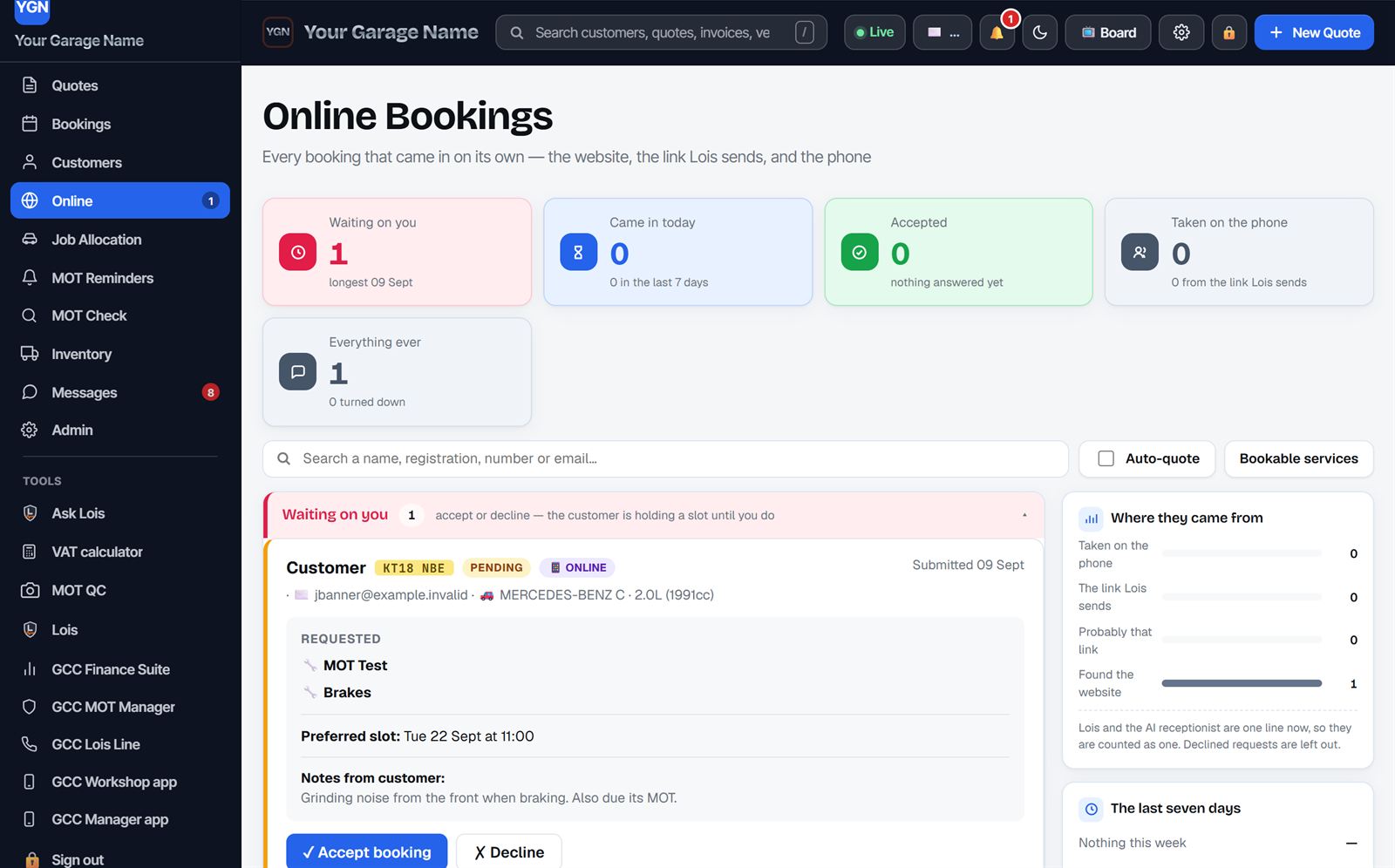
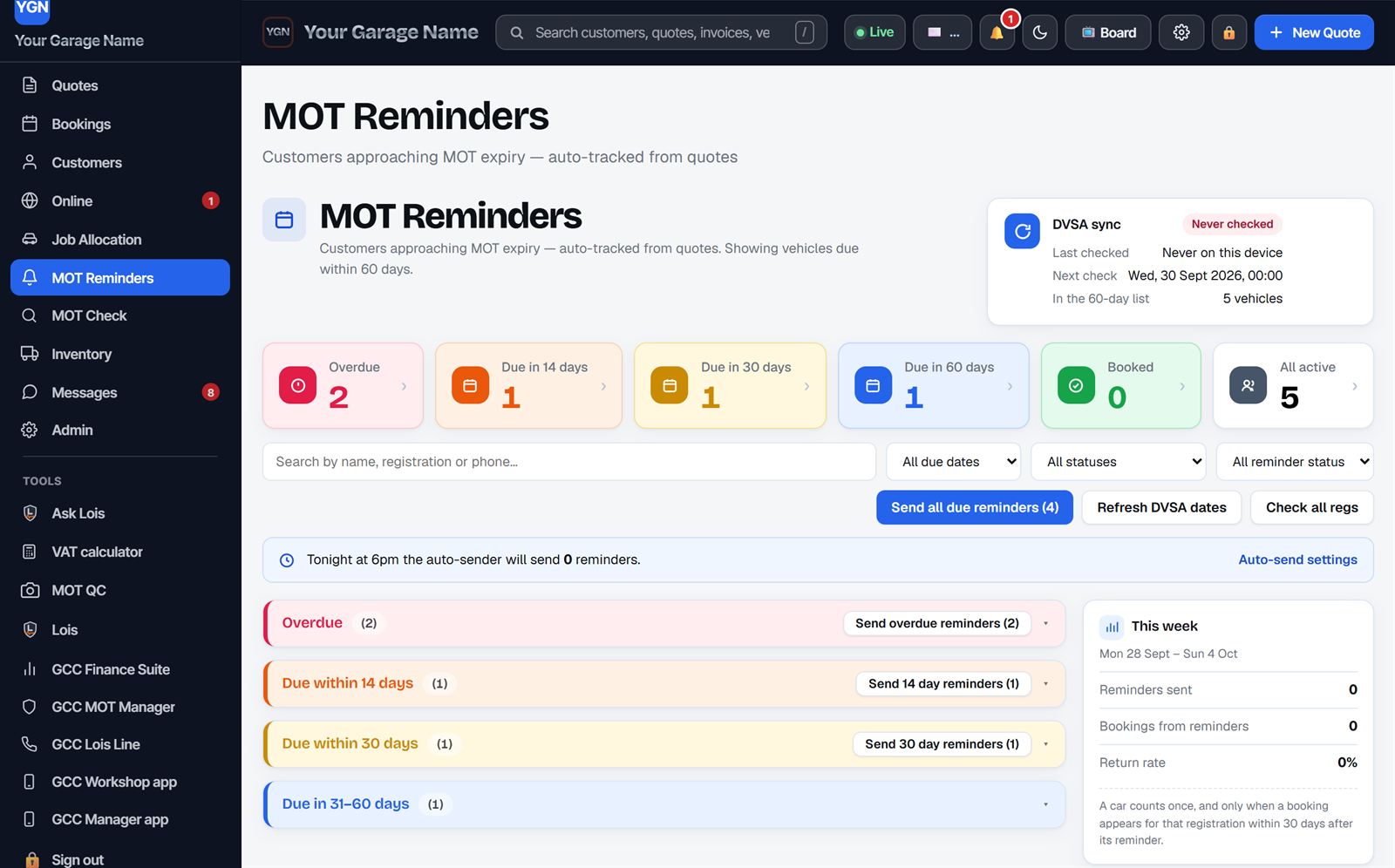
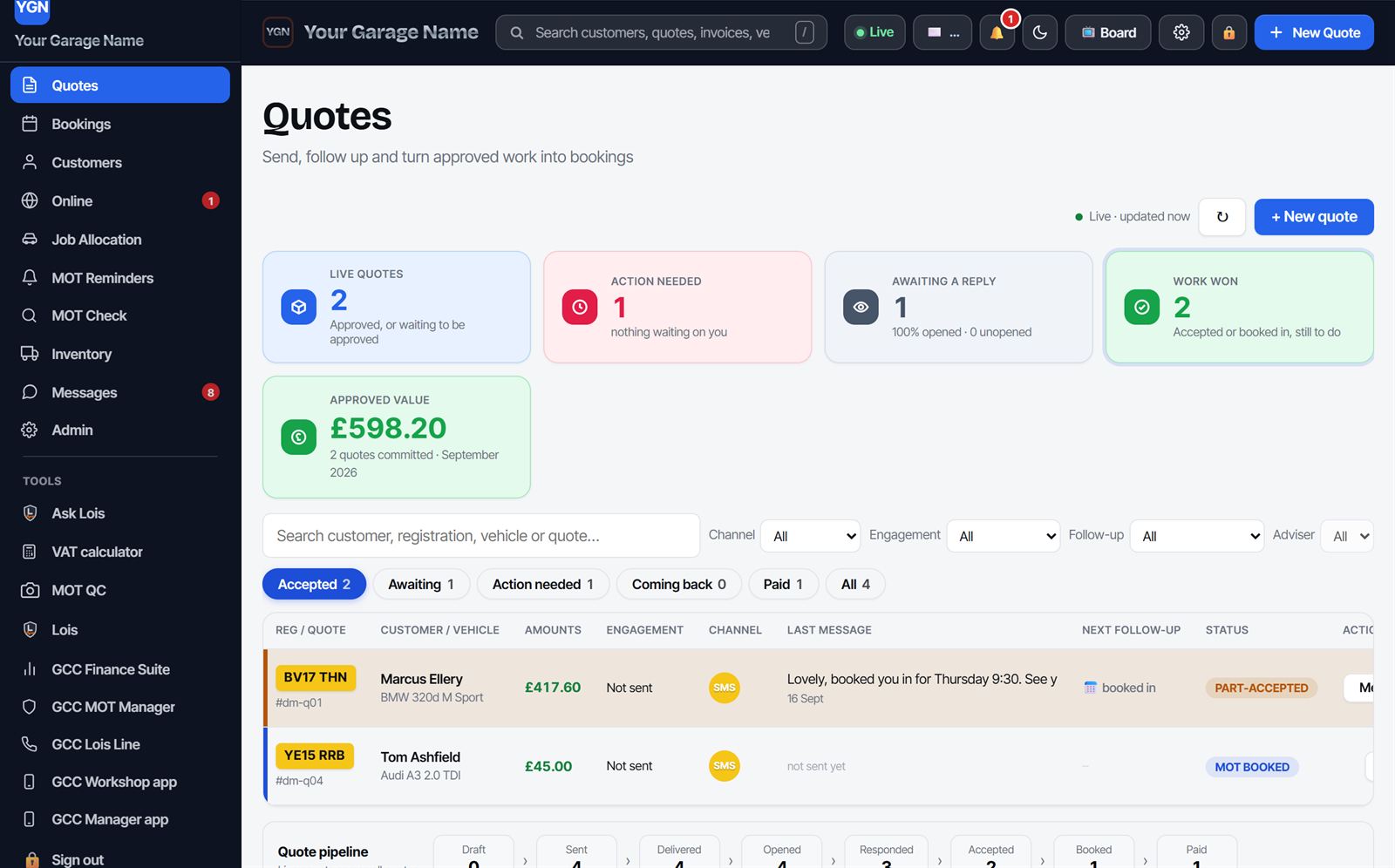
The Quotes screen: live quotes, action needed, approved value of £598.20, and two quotes listed with their registration, vehicle, price and status. Online Bookings: a request that came in from the website showing the car, the work asked for, the preferred slot and Accept or Decline buttons. MOT Reminders: vehicles grouped by overdue, due in 14, 30 and 60 days, with one button to send every reminder that is due.

Every quote, what stage it's at and what it's worth — including the reply the customer sent back.

A booking that arrived on its own, with what they want doing and when. Accept it and it drops into the diary.

Who's due, grouped by how urgent it is — and one button to send the lot.

Watch a quote built and sent — the real screens, nothing sped up to flatter it.

Sending a quote

Priced in the bay.
Accepted from the sofa.

A quote takes a couple of minutes and the customer never has to ring you back to say yes. They see the photo of what you found, the price beside it, and they tick the work they want.

  • Type the hours, not the money. The labour prices itself at your rate, from your own times saved against that car.
  • Photos from the bay go straight on. Whatever the tech fired in from their phone is already on the job, ready to drop onto the line.
  • They accept line by line. Brakes yes, tyres not this month — you see which, the moment they tap it.
  • No app, no login, no account. It opens on their phone from a text, and that's the whole journey.
Open one in the demo →

Parts, priced

Your trade price,
while you're writing the quote.

Connect your own GSF account and the parts catalogue comes to you. Type the reg, see what fits that exact car, and read your own cost against what it sells for — without a second screen, a phone call, or a guess that costs you the job.

  • Priced on your own account. Not a list price, not a guess. The figure your account actually pays, next to the retail price, so the margin is in front of you before you send anything.
  • What fits this car, not this model. Put the registration in and the catalogue answers for that vehicle, grouped front, rear, left and right, the way a fitter thinks.
  • Stock, before you promise a day. What's on the shelf at your branch and what's in the group, so you book the car in for when the part can actually be there.
  • Every brand they carry. Brembo, Bosch, Textar, Ferodo, TRW, Delphi and the rest, side by side with the specs that matter: diameter, thickness, material.

Needs your own GSF trade account. You keep your account, your terms and your branch — we just put them on the screen you're already working on. Tell us the account number and GSF switch it on.

Ask about GSF parts →

One registration in

  1. The car — make, model, engine code, off the plate.
  2. What fits — grouped by where it goes on the car.
  3. Your price — cost and retail, side by side.
  4. The stock — at your branch, and across the group.

Found money

Stops money walking
out of the door.

Most garages lose work quietly — the advisory nobody chased, the quote that went quiet, the MOT that lapsed to the place down the road, the call that rang out under a car. GCC keeps hold of all of it and puts it back in front of you.

  • Declined and advisory work, kept. Turned-down jobs stay parked with the original photos. Follow-ups are lined up for you automatically and go out in one tap — and never twice to the same person.
  • Quotes that go quiet get chased. A quote sent and not answered doesn't just sit there — the follow-up is scheduled for you and goes with one tap, so a £400 job isn't quietly forgotten by Friday.
  • MOT reminders, every night, no spreadsheet. Expiry dates come from the DVSA and the reminder texts go out on their own.
  • The calls that never became work. Every missed or dropped call sits in its own list with the name filled in from your records, so someone rings them back.
  • See what you left on the table. Every declined and expired job is counted and listed for you, so the advisory work nobody chased is a number you can work through, not a guess.
See it in the demo →

Four leaks, one system

  1. Advisories — parked with the photos, chased later.
  2. Quiet quotes — follow-up scheduled, sent with a tap.
  3. MOT lapses — reminders out every night, automatically.
  4. Missed calls — listed, named, ready to ring back.

The workshop camera

Every job, photographed
from the bay.

The tech has their phone in their hand anyway. They open the app, snap the worn disc, the leaking shock, the tyre down to the cords — a quick video, even — and it lands straight on that car's job. The office pulls the photos onto the quote, and the customer sees exactly what you saw.

  • Photos and video, straight to the car. Fired in from the bay, on the job before the tech's wiped their hands.
  • Proof that sells the work. A picture of the problem wins more than any phone call — and it's on the quote in a tap.
  • It covers you. Dated evidence of how the car came in, kept with the job for good.
  • A real App Store app. Approved and live — the tech signs in with a garage code, nothing to set up.
See it in the demo →

Your own website

A website that
brings the work in.

Not a page that sits there — a site that gets found, takes the booking and lets your customers help themselves. It's built out of your dashboard, so your services, prices and hours are always right, and every booking lands straight in your diary.

  • Found first — on Google and by AI. Built for maximum SEO and GEO: fast, structured and local, so you rank on Google and you're the garage that ChatGPT and AI search actually recommend near you.
  • Booking wired into your dashboard. The form looks up the reg, shows your real free slots and drops the job in your diary — no third-party widget, no double-entry, the customer gets a text back.
  • Every customer gets their own page — no app, no login. A personal link with the photos and the prices; they approve line by line, pay by card or finance, and their VAT invoice stays there for good.
  • Your name on it, works on a phone. Your own domain, your colours and logo, and it actually works on a phone — which most garage sites still don't.

One queue, in order

  1. Inbox — every text, longest wait at the top.
  2. Calls — phone messages and who rang, in the same place.
  3. Dropped calls — the ones that never became a job.
  4. Online bookings — new web bookings waiting to be confirmed.

Messages

Every conversation,
one queue.

Texts and phone messages land in one place, longest wait first — so the customer who's been waiting an hour is at the top, not buried under this morning's. Reply from the same screen, and it's logged against the car.

  • Your own number, and 300 texts a month in the price. We set you up with a number of your own, so a customer can simply text back and the reply lands in this queue. Nothing to open with a text company, and no separate bill.
  • One thread per customer. Every text in and out kept in the same conversation against the right car — not scattered across somebody's phone.
  • Names filled in for you. A number that's dealt with you before comes up as who they are, pulled from your own records.
  • Reply without opening the quote. The conversation sits beside the job, so you answer in seconds and get back under the car.
  • A push alert on your phone. A new booking or a customer reply pings you, so nothing waits until someone looks at the screen.
  • Nothing goes out by accident. Every reply is a tap from a signed-in member of staff — no auto-replies to customers.
See the queue in the demo →

The suite

The whole suite, one dashboard

Ask Lois is in the garage software and ready now, as a workshop window with 40 questions a month. The Finance Suite and MOT Manager are £9.99 a month each, added when you want them, and both are already in the £299 plan. Lois Line, the hybrid AI receptionist, is £200 a month on top. Whatever you add opens right inside the same dashboard, not in another login.

Ask Lois · In your dashboard, 40 questions a month

The answer, without
leaving the ramp.

A chat window that opens over whatever you're working on, wired into your own system. Ask it in plain English on the bay, get the answer, carry on. Forty questions a month are included, and it's the whole workshop that shares them, not one per person.

  • Labour times, straight out. "What's the labour time on a Focus clutch?" — answered from the repair-time book, not a guess.
  • The MOT manual, searchable. The full DVSA library, the right section read back to you, without walking to the office.
  • Parts, found and priced. Look a part up, check what it goes for, and keep the number against the car for next time.
  • Any reg, in seconds. Make, model, engine and the car's MOT history, read out before it's even off the ramp.
  • What's in today. Which cars are on, what stage they're at, and what's due its MOT.
  • How to do it here. Stuck on the dashboard? Ask, and it tells you where the button is.

This is the workshop window, which is what every garage gets. The deeper assistant that reads your figures and learns from your own files is on PDL's own system and isn't part of a garage plan.

See the dashboard in the demo →

Lois Line · On the £299 plan

She answers the phone
when you can't.

The phone goes while you're under a car, and it rings out. That's the job you didn't win. Lois picks up, knows which cars are in and what stage they're at, and tells the customer — because she's reading the same system you are.

  • She knows the live job status. Not a script — the actual stage that car is at, right now.
  • She takes a message properly. Reg, name, what they wanted, straight into your messages.
  • She only says what you've approved. You write the answers she's allowed to give, and nothing goes live until you publish it.
  • She holds you to your promises. "We'll ring you by half two" gets logged, and flags up if it's missed.
See Lois in the demo →

Also in the box

  • Inventory & partsShelf stock and the parts on each job
  • InvoicingBranded VAT invoices, no QuickBooks needed
  • Messages hubEvery text in one waiting queue
  • Job allocationEvery job on one board, by bay
  • Photo markupDraw on the picture the customer sees
  • Push alertsA booking or reply, straight to your phone
  • Dropped callsThe calls that never became work, surfaced to chase
  • Trade jobsA separate tab for your trade accounts
  • Customer historySearch any name, reg or number
  • Staff loginsEveryone on their own login, unlimited
  • ReportsWhat came in, and what went out
  • Staff holidaysWho's off, and when
  • Your brandingYour name, your colours, your logo

Pricing

Two prices, and seven days to try it.
No card, no setup fee, no tie-in.

£99 a month runs the whole garage. £299 is the lot: every add-on plus Lois, the hybrid AI receptionist who answers the phone when you can't. Both start with a free 7-day trial. We're not VAT registered, so the figure you see is the figure on your invoice.

The software

Run the whole garage

£99a month

Free for the first 7 days

Everything you need to run the workshop day to day.

  • Quotes with photos, accepted on the customer's phone
  • Online booking straight into your diary
  • Live workshop board, by bay
  • MOT reminders and DVSA MOT history by reg
  • GSF parts priced on your own account, with live stock
  • Your own texting number customers can reply to, 300 texts a month included
  • Card payment links and finance, on your own merchant account
  • Ask Lois, the workshop AI, 40 questions a month
  • Invoicing, inventory, reports, unlimited staff
  • Add MOT QC, the Finance Suite or your website whenever you want them
Try the demo first →
Everything · including the hybrid AI receptionist

The lot, and she answers the phone

£299a month

Free for the first 7 days

Everything above, both add-ons, and Lois on the phone.

A receptionist costs you a wage every month, plus holiday, plus sick pay, and still goes home at five. Lois doesn't. She picks up on the first ring at eight at night and on a Sunday, she never has a day off, and she never leaves for a better job six months after you trained her.

  • Answers every call you can't, so the job doesn't ring out and go to the garage down the road
  • Knows which cars are in and what stage they're at
  • Takes a proper message: reg, name, and what they actually wanted
  • Books the work straight into your diary
  • Only ever says what you've approved her to say
  • No wage, no NI, no holiday cover, no recruiting
  • MOT QC and the Finance Suite included, not billed on top

That's £200 a month on top of the software, and it carries both add-ons with it, for someone who never misses a call. A part-time receptionist costs you four or five times that before holiday cover.

Start the 7-day trial →
Add what you need, when you need it

MOT QC

£9.99a month

Your tester QC observations, site audits, equipment calibration and training hours, signed off and logged. Built to replace the site-check subscription you already pay for.

Finance Suite

£9.99a month

Proper double-entry books behind the garage: bank feed, supplier bills, VAT returns and a real profit and loss. Not just invoicing. Connects to your own Xero or QuickBooks account.

A bespoke website

Bespokequoted for you

Built for your garage, not a template. We design it, host it and keep it live, with online booking and customer accounts wired straight into the system, so customers can see their quotes, invoices and MOT dates without ringing you. Tell us what you want and we'll price it.

Builtin a working garage, used every day
£0setup fee, no tie-in
Livedemo — no signup to look round

Questions garages actually ask

Straight answers.

Does it replace my current garage software?

Yes. Garage Command Centre is the whole system: quotes, the diary, the workshop board, MOT reminders, customer messaging, invoicing and reports. Most garages run it instead of what they have, not alongside it.

Can you move my customers and history across?

Yes, and we do the work. Migration is free and we handle it, so you are not rekeying customers, vehicles or MOT dates into a new system.

Do my customers need an app or a login?

No. A quote arrives as a text. They tap the link, see the photos and prices, and accept the work line by line in their phone's browser. There is nothing to download and no account to create.

Can customers text me back?

Yes. You get your own number, so a customer can reply to any message you send. Replies land in one queue with the longest wait at the top, and every message is logged against the car. 300 texts a month are included on every plan.

How do the MOT reminders work?

Expiry dates come from the DVSA, so there is no spreadsheet to keep. Reminders go out overnight on their own, and a customer who asks to stop receiving them is taken off the list. They switch on during onboarding, once your own messaging number is live.

Does it pull DVSA MOT history?

Yes. Type a registration and you get that vehicle's full DVSA MOT history and defect list, so you can see what it failed on last time before it comes in.

Who handles the card payments?

You do. Payment links are sent from the system but the money goes through your own merchant account, so we never hold your takings and you keep the rate you have already negotiated.

Is there a contract or a setup fee?

Neither. You pay monthly in advance and can cancel at any time by email, with access running to the end of the period you have paid for. There is no setup fee and no minimum term.

What happens to my data if I leave?

It stays yours. You are the data controller and can export your records at any time. If you leave you can request a full copy for 90 days afterwards, and after that we delete it apart from records the law requires us to keep.

Does it work with Xero or QuickBooks?

Both. The Finance Suite connects to the garage's own Xero organisation or QuickBooks company, so your accountant carries on working where they already work. You sign in on Xero's or QuickBooks' own page and pick which company to link, which means we never see your accounting password and you can disconnect us from your side at any time. Sage 50, the desktop version most garages run, has no way for any system to connect to it, so for that we give you a file to import.

Can I see parts prices from my supplier?

Yes, if you hold a GSF trade account. Connect it and you can type a registration, see the parts that fit that exact vehicle, and read your own cost price against the retail price with live stock at your branch. You keep your own account, your own terms and your own branch. Ordering from inside the system is not available yet.

How much does it cost?

£99 a month for the garage software, or £299 a month for everything, which adds MOT QC, the Finance Suite and Lois Line, the hybrid AI receptionist who answers your phone. Both start with a free 7-day trial. On the £99 plan, MOT QC and the Finance Suite are £9.99 a month each. A website is built bespoke for your garage and quoted on what you want. We are not VAT registered, so there is nothing to add on top.

Take command of your garage

Less admin. More workshop.

Have a look round the demo first — then if it fits how you work, drop us a line and we'll set you up with your own.

Ask us anything

Leave an email or a phone number and we'll come back to you. No newsletter, no sales call unless you ask for one.